n8n Course: Build Real Automations and AI Agents
Learn n8n through 39 practical chapters covering installation and self-hosting, nodes and expressions, Airtable and Telegram automations, AI workflows, and AI agents.
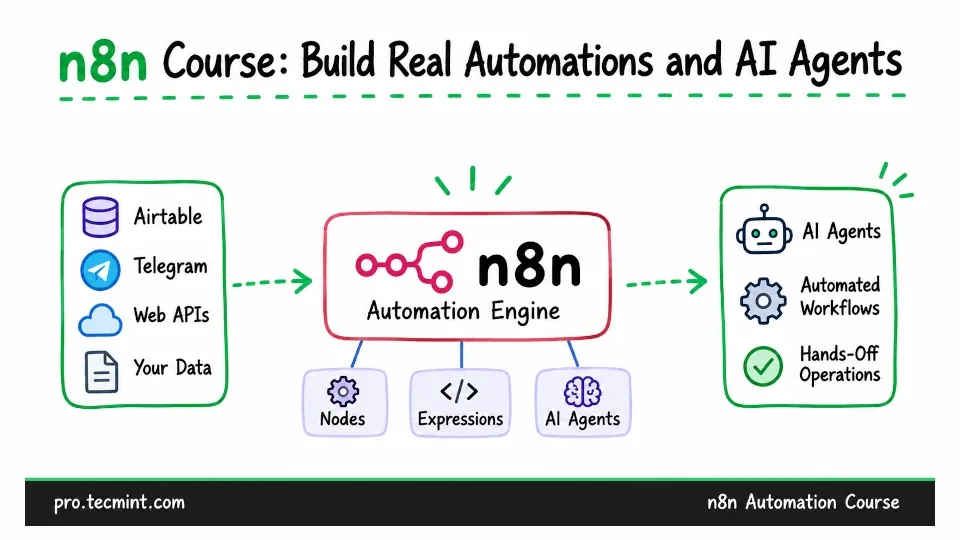
You've probably heard a lot about AI automation by now: what it can do, the businesses being built around it, and the people quietly making a living from it.
Maybe you're wondering how to learn those skills yourself, start a career in this field, and move from simply reading about AI agents to actually building them. If that's where you are, you're in the right place.
This course on AI automation and agentic applications is designed to help you turn that curiosity into practical skills you can add to your resume and use in real projects.
Instead of just introducing different tools, it takes you step by step from building your first working automation to creating systems that businesses can rely on.
How the Learning Path Works
First, you'll learn what n8n is, how it compares to Zapier, and the difference between a workflow and an AI agent. This is one of the most misunderstood concepts, so we'll make sure you understand it before you start building anything.
Next, the course includes four separate setup chapters covering npm, Docker, Railway, and a complete self-hosted installation on a Linux VPS with Nginx and SSL. You can choose the deployment method that best fits your needs instead of being limited to a single approach.
Once your environment is ready, you'll move into the core of the course, which is the most important section because it's where you'll build the skills you'll use in every project.
You'll learn how to work with the n8n canvas, understand the difference between triggers and actions, use the HTTP Request node to connect with virtually any API, write expressions to pass data between nodes, use the Code node when visual automation isn't enough, and schedule workflows with cron.
By the end of this module, you'll have built complete automations using Airtable and Telegram.
With those foundations in place, it's time to bring AI into your workflows. You'll integrate OpenAI and OpenRouter so your automations can do more than follow predefined steps.
They'll be able to generate SEO metadata, analyze customer reviews, write and edit articles, and create images automatically, reducing the need for manual work.
From there, you'll build real AI agents that can answer support requests, organize and prioritize emails, and handle routine tasks on their own.
You'll also learn error handling, reusable sub-workflows, credential management, and the best practices for backing up and maintaining a self-hosted n8n instance.
Why n8n?
There are several popular automation platforms available today, including Zapier and Make.com. They're both capable tools, but n8n has become a favorite among developers, system administrators, and AI builders because of its flexibility and growing community.
Another major advantage is that n8n is open source and can be self-hosted, so that you get complete control over your data, credentials, and infrastructure.
n8n also has excellent support for AI agents, memory, and tool calling are built directly into the platform instead of being added through third-party extensions.
If you're wondering how n8n compares with platforms like Zapier, don't worry. In Chapter 2, we'll compare them side by side so you can clearly understand their strengths, differences, and when each one makes the most sense.
What You'll Be Able to Do After This Course
By the time you finish, you'll be able to:
- Install and run n8n using four different methods, including a production-ready self-hosted deployment on a Linux VPS with Nginx and an SSL certificate.
- Understand the n8n canvas with confidence, knowing when to use triggers, actions, and the right nodes to build efficient workflows.
- Connect to virtually any service using the HTTP Request node, even if there isn't a dedicated n8n integration available.
- Write expressions to pass data between nodes and use the Code node with JavaScript whenever you need more advanced logic.
- Schedule workflows with cron so your automations run automatically, even when you're away from your computer.
- Integrate services such as Airtable, Telegram, Gmail, and Google Drive, while organizing data cleanly with the Set node.
- Build complete automation projects from start to finish, including a smart expense tracker, a Telegram stock notification system, and inventory updates driven by customer orders.
- Add AI capabilities using OpenAI and OpenRouter to generate SEO titles and descriptions, analyze customer reviews, write and edit articles, and create images automatically.
- Build AI agents that can answer customer support questions and process email without requiring manual approval for every action.
- Extract structured data from PDF invoices, publish content directly to WordPress, and automatically share published articles on Facebook.
- Organize large projects by splitting them into reusable sub-workflows instead of maintaining one large, difficult-to-manage workflow.
- Handle errors properly so failed workflows generate alerts instead of silently stopping.
- Store credentials securely and keep your self-hosted n8n installation backed up, updated, and reliable over time.
Who This Course Is For
This course is for anyone who wants to learn automation in a practical way, whether your goal is to build a career, earn freelance income, or automate your own work.
It's especially useful for:
- Complete beginners to automation who want a clear learning path instead of jumping between random tutorials.
- Linux admins and DevOps engineers who already automate with shell scripts and want to add AI-powered workflows to their toolkit.
- Developers who want to build integrations and internal tools quickly without writing everything from scratch.
- Freelancers and consultants who want to offer automation services to clients and small businesses.
- Ops, marketing, and support professionals who want to eliminate repetitive manual work.
- Anyone curious about AI agents who wants to build real, working systems instead of only learning the theory.
What You Need to Start
One of the biggest concerns when starting something new is wondering whether you already know enough. The good news is that the requirements for this course are simple.
You don't need any experience with AI, and you don't need to be a programmer. If you've used ChatGPT before and are comfortable running a few commands in a terminal, you already have everything you need to get started.
Everything else gets explained as we go: what an API is, what a webhook does, how an LLM handles a prompt, why an agent needs memory.
For the installation module, you'll need access to a Linux system, whether it's a Linux laptop, a virtual machine, or a small cloud server. If you're new to Linux, the Ubuntu Handbook and Learn Linux 7 Days course are great places to start.
What the Course Covers
The course is organized into 8 modules and 38 chapters, starting with the basics and gradually builds your skills until you're creating production-ready automation systems.
- Module 1: Foundations (Chapters 0-2)
- Module 2: Installation and Setup (Chapters 3-6)
- Module 3: Core Concepts (Chapters 7-16)
- Module 4: Practical Automations (Chapters 17-19)
- Module 5: AI-Powered Workflows (Chapters 20-27)
- Module 6: AI Agents (Chapters 28-30)
- Module 7: Advanced Integrations (Chapters 31-36)
- Module 8: Wrap-Up (Chapters 37-38)
What You Get With Membership
When you join Pro TecMint, you get:
- Access to all 38 chapters of this course, with practical, hands-on lessons and downloadable workflow JSON for each project.
- Lifetime access, including all future updates and new chapters added to this series.
- Access to all Pro TecMint courses, including RHCSA, RHCE, and LFCS certification preparation.
- Access to the Telegram community, where you can ask questions and compare builds with other learners.
- A certificate of completion once you finish the course.