Chapter 2: Basic File Management in Linux
In this chapter, you'll learn how the Linux file system is structured, the different file types, and the core file management commands every Linux user needs to know.
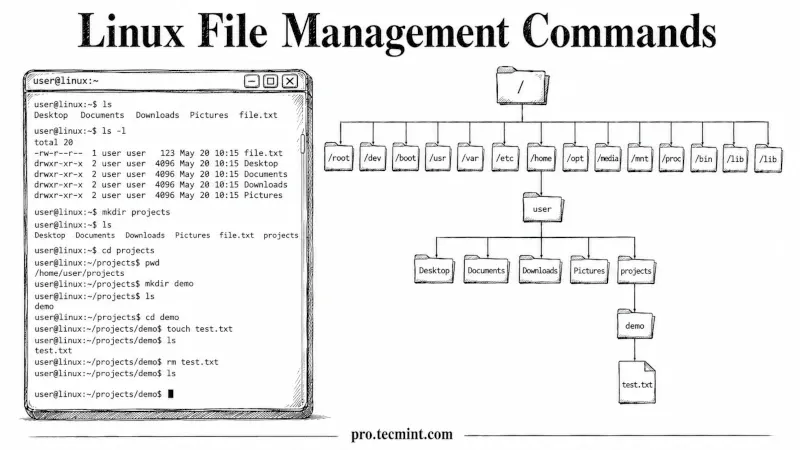
In Chapter 1 of the LFCA Certification Course, you learned what Linux is, where it came from, how its core components fit together, and why it dominates the server and cloud industry, and that context matters because it shapes how Linux is designed to work.
This chapter puts that understanding to work by covering the Linux filesystem and the file management commands you'll use on any Linux system, every single day, and these commands map directly to the Linux Fundamentals Domain (16%) of the LFCA exam.
Every command in this chapter was tested on Ubuntu 26.04 LTS, but they work on any modern Linux distribution.
One of the biggest mindset shifts when moving from Windows to Linux is understanding that Linux treats almost everything like a file.
When you use Windows, you usually think of files as documents, images, or programs; that's what most people mean by "file". Linux thinks differently.
In Linux, almost everything is treated as a file. Not just your documents and folders. Your keyboard is a file. Your hard drive is a file. Your CPU information is a file. Even running programs are represented as files somewhere in the system.
What this means in practice is simple but powerful: if you know how to work with files, you can control almost everything in Linux.
For example, instead of opening a settings panel, you might edit a configuration file. Instead of using a device manager, you might interact with a device through a file.
Even system information can often be read just by opening and viewing certain files.
That’s why learning how to navigate the filesystem, read files, edit them, and manage permissions isn’t just a beginner topic; it’s the core skill. Every advanced task, from system administration to automation, builds on this foundation.
If you get comfortable with files in Linux, you’re not just learning one skill; you’re learning how the entire system works.