Chapter 31: SSH Remote Port Forwarding
In this chapter, you'll learn how SSH remote port forwarding works, how to expose local services to remote servers, and how to set up reverse SSH tunnels for NAT traversal.
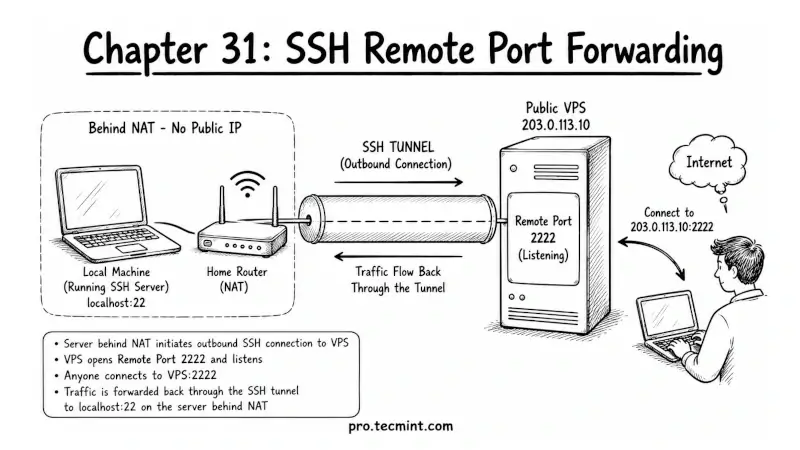
In the previous chapter, you learned how local port forwarding lets you access remote services as if they were running on your own computer.
You used SSH tunnels to securely reach databases, web dashboards, and services inside private networks without exposing any ports to the internet.
Remote port forwarding does the opposite; instead of bringing a remote service to your local machine, it makes a service running on your local machine available through a remote server.
In other words, SSH creates a tunnel from your local system to the remote server, and people can connect through the remote server’s public IP address.
This is what makes reverse SSH tunnels possible, and it is extremely useful when your machine is stuck behind NAT, a home router, a corporate firewall, or a changing public IP address.
Even if your local system cannot accept direct incoming connections, it can still create an outgoing SSH connection to a remote server and expose services through that server.