Chapter 3: Create a GitHub Profile Inspector
In this project, you will learn how to build command-line tools in Go using the os package, work with user arguments, validate input, and create interactive CLI applications that communicate with real-world APIs.

In this project, you'll build a command-line tool that fetches GitHub user information and displays their recent repository activity.
The tool will accept a GitHub username as input and show profile details along with their latest contributions, creating a complete snapshot of a developer's GitHub presence.
What You'll Learn
- Working with command-line arguments using the
ospackage. - Building interactive CLI applications.
- Making API calls to real-world services (GitHub API).
- Handling user input validation and error cases.
- Formatting output for better readability.
Introduction
One of the most common areas where Golang is popular is in building command-line applications that solve various problems, especially those related to system administration and the DevOps field.
You probably have already used some of these tools, like the Docker CLI, which is a tool to communicate with Docker, and it is built using Golang.
Another one is kubectl, which is used to talk to the Kubernetes control plane, which is also developed using Golang, and many more tools choose Golang as the backend because of its efficiency and power that it gives out of the box.
In this project, we will build a GitHub command-line tool using the GitHub API that will solve a real problem and boost the productivity of our users.
GitHub API
In Project 1, we used the simple FakeStoreAPI, which simulates an online store just for testing and learning purposes, but this time, we will use a real-world API, which is the GitHub API.
It gives us all the information about users, repositories, stars, commits, and everything in JSON format publicly, without the need to authenticate.
Just like the other one, the GitHub API can be accessed at the following url.
https://api.github.com
For example, if you want to get information about your account, in case you have one, you can use the link with your username (in our case, the username is tsooding) as shown.
https://api.github.com/users/tsooding
You can use the browser and paste the link, or use command-line tools as we used before, such as curl to get all this information straight away in your terminal, as shown.
curl https://api.github.com/users/tsooding
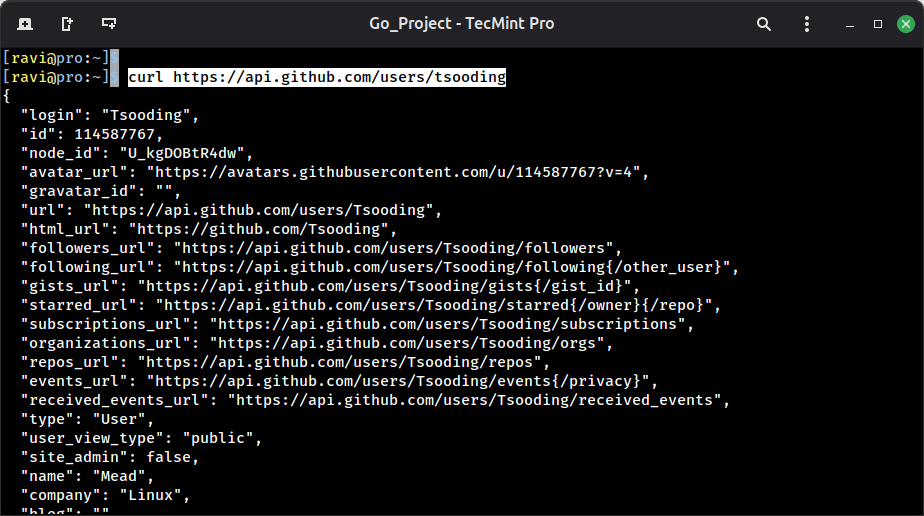
This will show all the information about the GitHub account, including name, picture, how many public repositories they have, the description, location, etc.
Actually, you can do a lot of useful tasks with the GitHub API to solve time-consuming and effort-intensive tasks related to GitHub projects.